Hangrail documentation
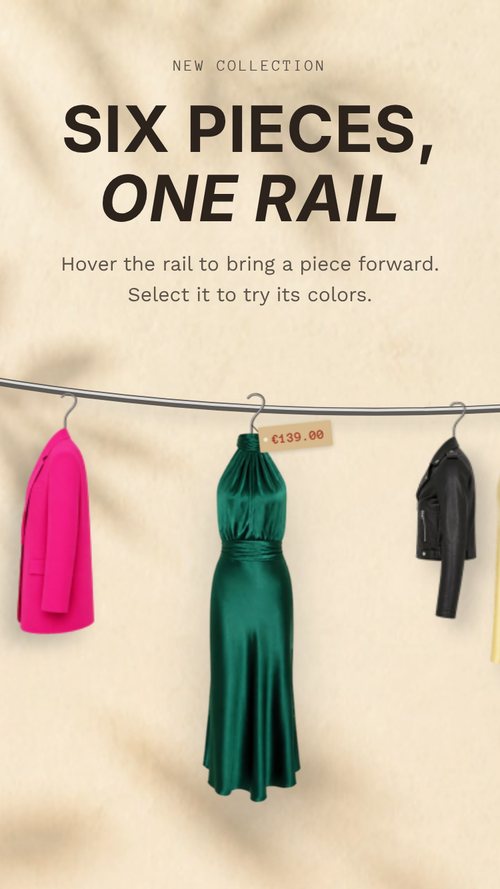
Hangrail presents clothing the way a showroom does: a steel rail, wire hangers, kraft hang tags for colors and a yellow tape measure for announcements. Products can appear as photos or as drawn garment mockups that recolor with the selected variant.
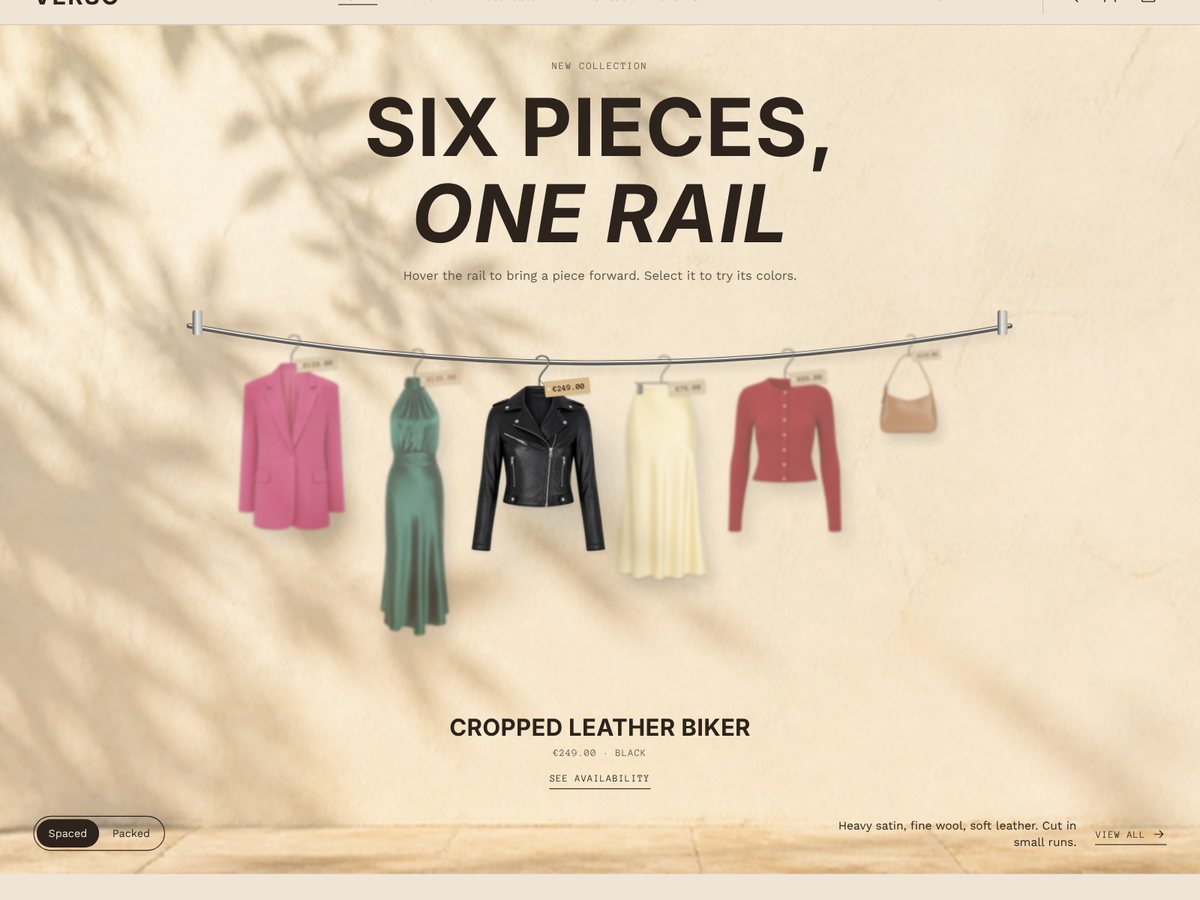
- The piece under the pointer steps forward
- Its name and price, with a link to availability
- Switch between the spaced and packed views
Get started in four steps
- 1InstallOnline Store › Themes › Add theme › Upload zip file.
- 2Hang a collectionIn the Clothing rack section, choose the collection to show on the rail.
- 3Add your productsCut-out photos hang by themselves. Or make a product a mockup with a
mockup:tag. - 4PublishCheck the store on a phone, then select Publish.
10Install the theme
- In Shopify admin, open Online Store > Themes.
- Select Add theme > Upload zip file and choose
hangrail.zip. - Select Customize to open the theme editor.
- In the Clothing rack section on the home page, choose your new collection: a few pieces hang on the rail. Below it, the store continues like a classic site: pick a collection in Featured collection and the pieces of a look in Shop the look.
- Select Publish when you're ready.
Until you pick products, sections show drawn garments on the rail, so the store already looks like Hangrail on day one.
20Show a product as a mockup
A product turns into a drawn mockup when it has the tag mockup:<type>, for example mockup:hoodie. Without that tag, the product shows its photos.
| Level | Types to write after mockup: |
|---|---|
| Essentials | tee, longsleeve, tank, crewneck, tdress, shorts, skirt |
| Classics | hoodie, ziphoodie, polo, shirt, jersey, slipdress, joggers, cargo, jeans |
| Statement pieces | overshirt, vest, puffer, denim, varsity, anorak, shirtdress |
| Accessories | cap, beanie, pombeanie, tote |
| Underwear and lingerie | boxer, brief, bra, balconette, sportsbra, bikini, thong, highwaist, bodysuit |
The printed artwork
- Add the artwork (logo, pattern, illustration) as a product image, ideally a
.pngwith a transparent background. - In the image's alt text, add
[front]for the front or[back]for the back. Example:Star logo [front]. - Without a marker, the first product image is used as the front artwork.
- Artwork images stay in the product page gallery, after the mockup and the photos.
Placement and size
| Tag | Effect | Default |
|---|---|---|
print:chest, print:center, print:all, print:fabric | Front placement: chest, center, whole piece | center |
print-back:chest, print-back:center, print-back:all | Back placement | center |
print-size:120 | Artwork size in % | 100 |
size:80 | Size of the product on the rack in % | 100 (caps, hats, bags: 70) |
A garment made of your fabric
For a printed fabric (toile, check, floral…), photograph a flat piece of the fabric, add it as a product image with [front] (and [back]) in its alt text, and tag the product print:fabric (and print-back:fabric). The photo repeats over the whole garment and the seams, pockets and shading stay visible. Use a white or light color for these variants. print-size sets the size of the repeat.
Fabric texture
Add texture:corduroy, texture:knit, texture:fleece, texture:denim, texture:waffle, texture:lace or texture:satin to give the mockup the look of its fabric. Beanies are always knitted.
Your own photos on the hanger
Products without a mockup: tag show their photo, and a cut-out photo hangs on a hanger by itself. See Photos on the hanger.
On trousers and shorts, chest means the thigh and center the leg. On the tote bag they are a small and a large print.
Garment color
The mockup takes the color of the selected variant. Create a Color option and give each value a swatch in Shopify admin. Without a swatch, the theme tries the color name in English (black, navy…), then the default color set in Theme settings > Colors. The option names treated as colors are set in Theme settings > Rack and mockups.
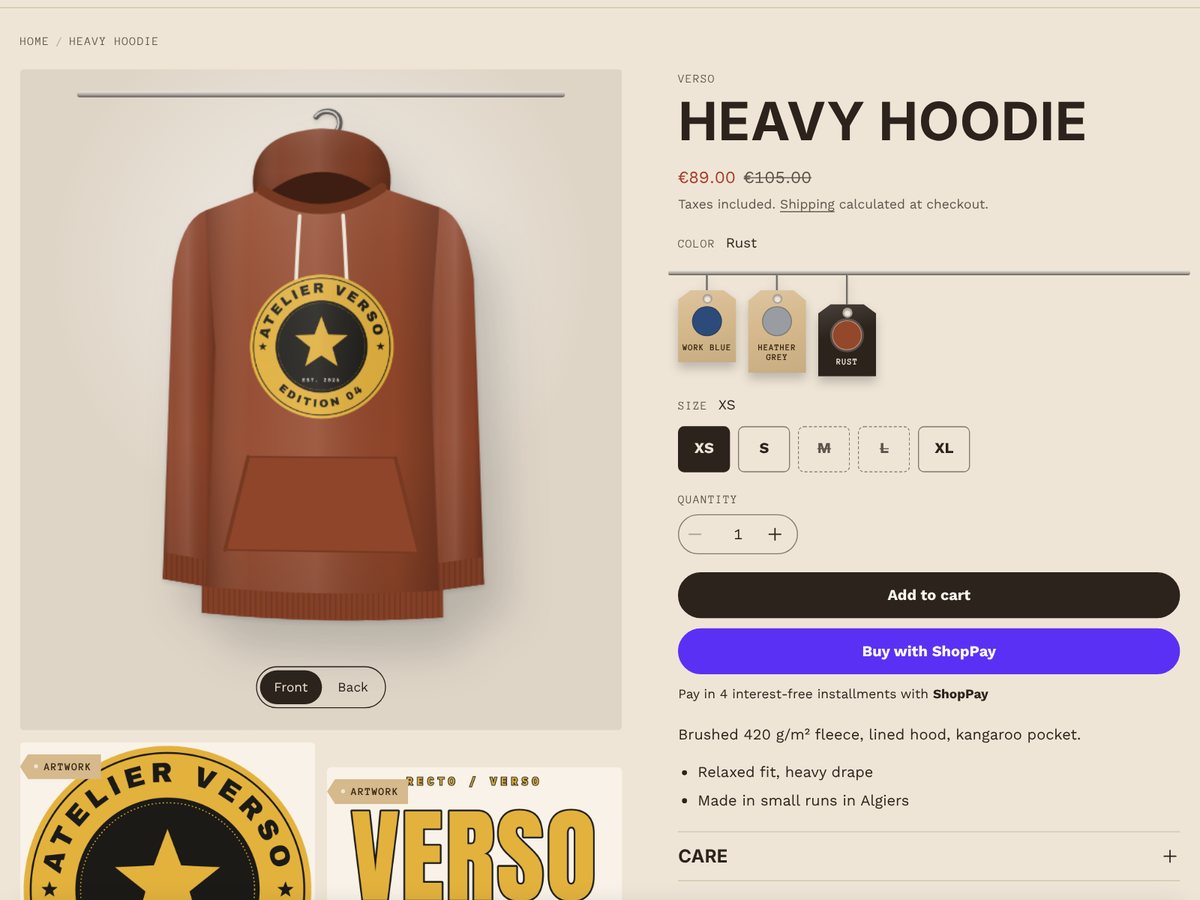
- The mockup takes the chosen color
- Front / Back switch
- Colors as kraft hang tags
- Sizes as buttons
- Add to cart and accelerated checkout
30Photos on the hanger
Any product without a mockup can show its own photo. When the photo has a transparent background, Hangrail hangs it like a real garment: on the rack, on the product page, in quick view and in Shop the look. In product grids the photo is shown whole, without a hanger. There is nothing to set up: the theme reads the photo and picks the hanger.
In four steps
- 1Photograph the garment alone, flat or on an invisible mannequin, on a plain background.
- 2In Shopify admin, open the image, choose Color background › Transparent, then Save as new. You get a PNG.
- 3Make this PNG the product’s first image. Don’t add a
mockup:tag. - 4That’s it: the garment hangs by itself, everywhere in the store.
What the theme reads
Hangrail looks at the photo at a tiny size and draws a hanger for it. The hook comes out of the collar; the bar sits behind the garment and ends inside its outline, so it only shows between two straps. A flat waistband, or a product type such as Trousers, Jeans or Skirt, means bottoms: two clips grip the ends of the waistband. Then the photo is lifted so the top of the hook reaches the rail.
Three ways to hang
- HangerTops, dresses, jackets, coats and bras. Between two straps, the bar shows.
hanger:bar - ClipsTrousers, jeans, skirts and shorts, recognized from the product type or a flat waistband.
hanger:clip - HookCaps, hats, beanies and bags, recognized from the product name in 19 languages.
hanger:hook
The theme chooses for you. To force a choice, add the tag to the product.
Size on the rack
Side by side, each photo is sized so garments keep their real proportions: a long dress hangs longer than a blazer, a bag smaller than a coat. Clothes hang at full size. Caps, hats, beanies and bags hang at 70%: change it in Theme settings › Rack and mockups › Size of caps, hats and bags (100% keeps them full size). To resize one product, add a tag like size:75, from 30 to 150: a kids’ skirt at size:75, a long coat at size:110.
Photos that work best
- WorksFlat layBackground removed.
- WorksInvisible mannequinBackground removed.
- AvoidWorn by a modelThe cut-out keeps the body, which would hang too.
- AvoidJPG with a backgroundShown framed, held by two clips.
Use at least 1200 px on the long side, keep the whole garment in the frame (sleeves and hems included), crop close to it, and light the whole collection the same way.
Side view, back view and turn
Extra images of the same product add movement. Mark them in their alt text (in Shopify admin, open the image and edit its alt text):
| Alt text | Image | What it does |
|---|---|---|
[side] | The garment seen from the side | The packed rack hangs it side-on; the chosen piece turns to face the shopper. |
[back] | The garment seen from behind | The close-up view gets a Front / Back switch. |
[turn] | A short video of the garment turning from its side to its front (on a video, not an image) | Replaces the photos in the packed rack: it plays when the piece is chosen and runs back when it is put back. Its plain background is removed by the theme. On the product page it plays in a loop, without sound. |
Add the color name to use an image for one color only, for example Blazer [side] Black. Shoot side and back views like the front (same light, same distance) and remove their background the same way. For a turn video, film or generate 2 to 4 seconds on a plain light background, the garment on its hanger at the top of the frame; it starts on the side view and ends on the front. The tags are not read aloud to shoppers.
The setting
Theme settings › Rack and mockups › Product photos without a mockup: Automatic (default) hangs photos with a transparent background and frames the others. Cutout on hanger always hangs them, Framed photo always frames them.
40The clothing rack
The rack is the signature of the theme. It appears in the Clothing rack section, in the collection page views and in Related products.
- Spaced: garments hang side by side. The hovered piece steps forward and the others fade.
- Packed (3D): garments hang tightly, side-on. The hovered piece turns to face the shopper and steps forward, its neighbors fan out and sink back with distance, and the perspective follows the mouse. On phones, the piece in the middle of the screen turns as the shopper scrolls.
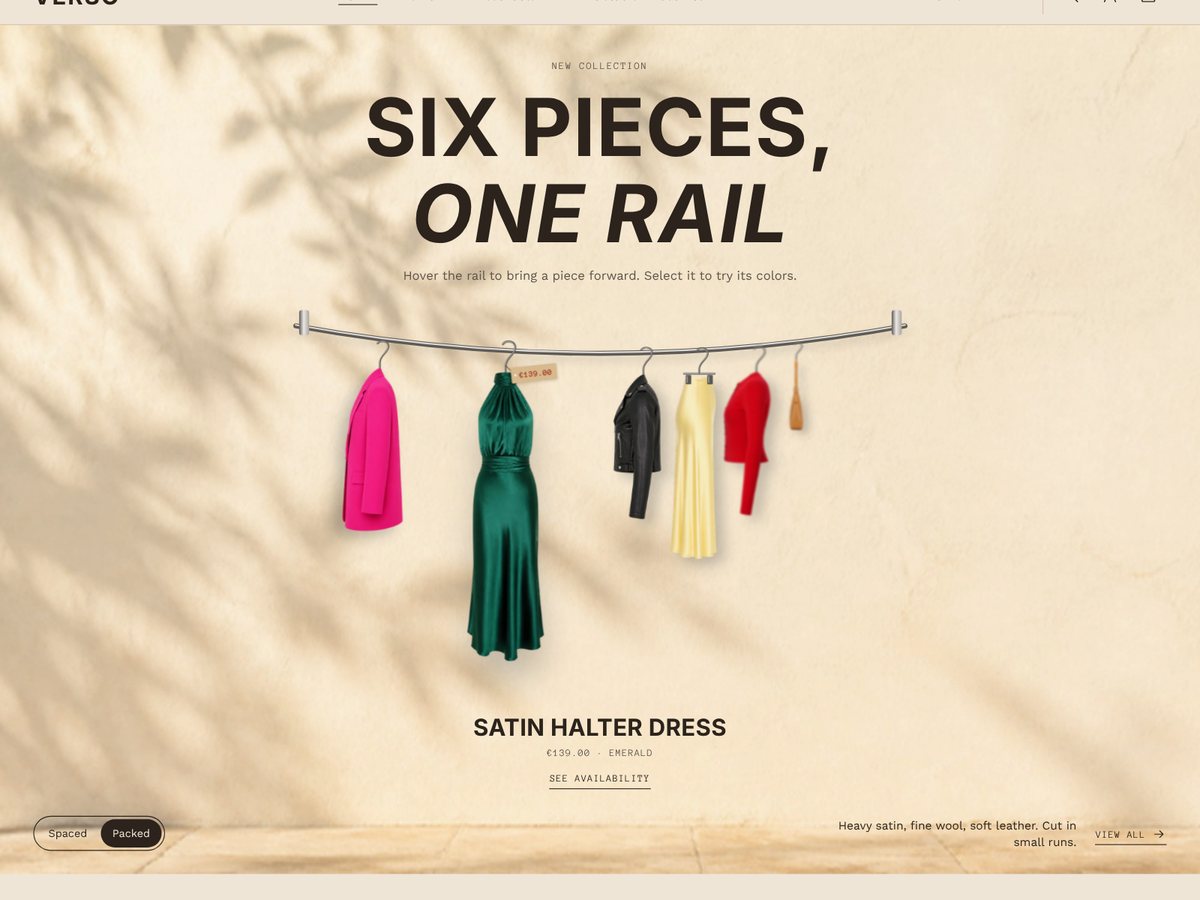
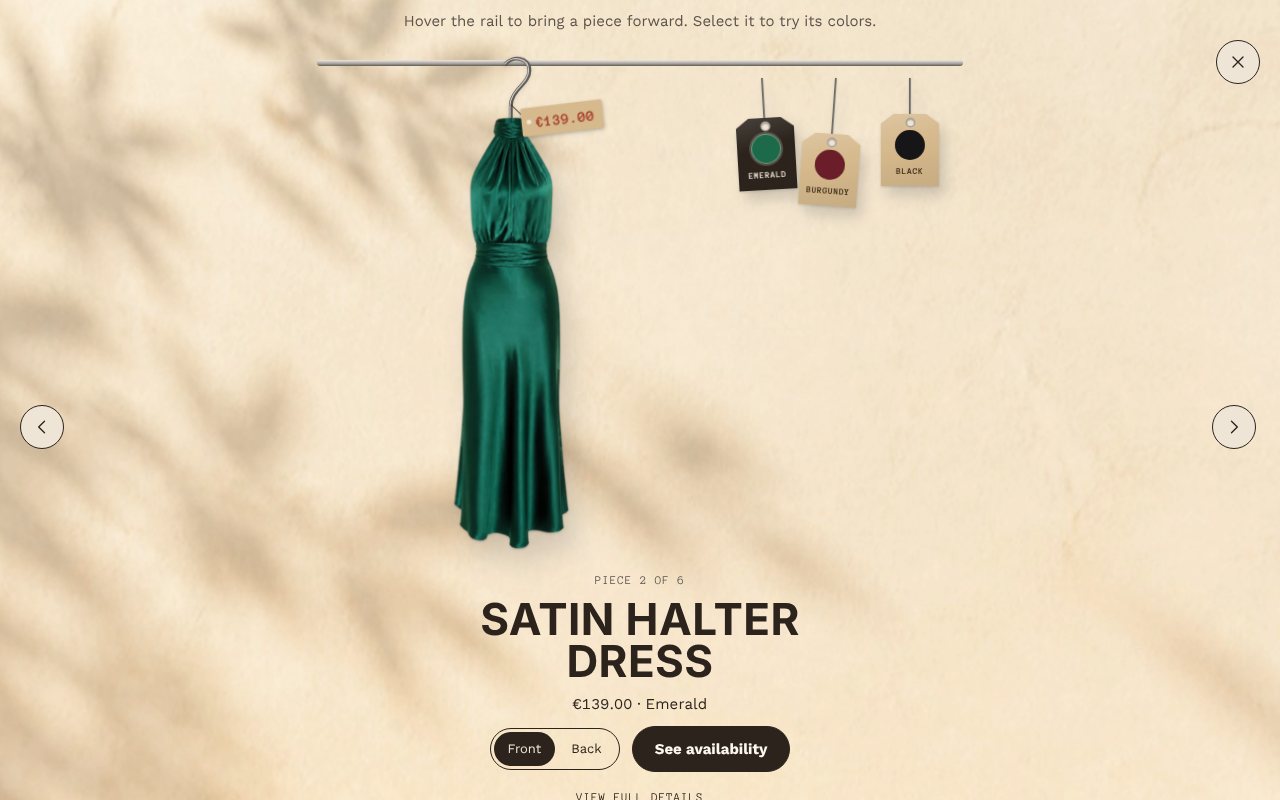
Selecting a piece opens a close-up with its back and its colors as hang tags. See availability opens the quick view, where shoppers choose a size and add to cart.
Setting up the section
- Layout: the heading on the left, or centered above the rail with a subheading over it. The centered layout moves the view switch, a short Text under the rail and the collection link to a row below the rail.
- Rail shape: straight, or curved, sagging a little in the middle like a real rail. Each garment hangs from the point of the curve above it.
- Price tags: a small kraft tag with the price hangs from each hook. In the packed view, only the chosen piece shows its tag. Sale prices are written in the sale color.
- Background image: a wall, a studio or a landscape behind the rail, with an Overlay in the color of the section's scheme to keep text readable.
Side views, back views and turn videos come from the product's own images: see Photos on the hanger.
50Sections
| Section | What it does |
|---|---|
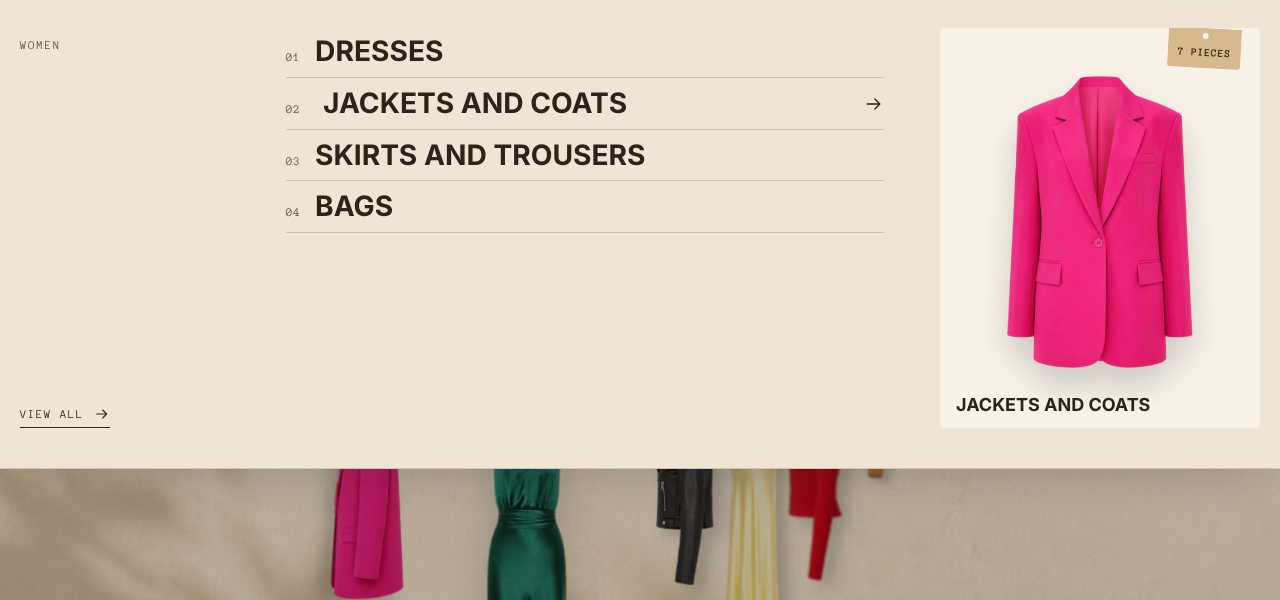
| Header | Logo, menu, search, account, cart, country and language. A menu link with sub-links opens a panel across the page: its links come in one by one and the picture of the collection under the pointer shows beside them, with its count on a hang tag. On phones, each level of the menu slides in over the previous one. |
| Clothing rack | A collection hung on the rail, spaced or packed, with an optional view switch. |
| Tape measure band | Scrolling announcements on a tape measure, with a pause button. |
| Featured product | A full product form on any page, with the mockup on its hanger. |
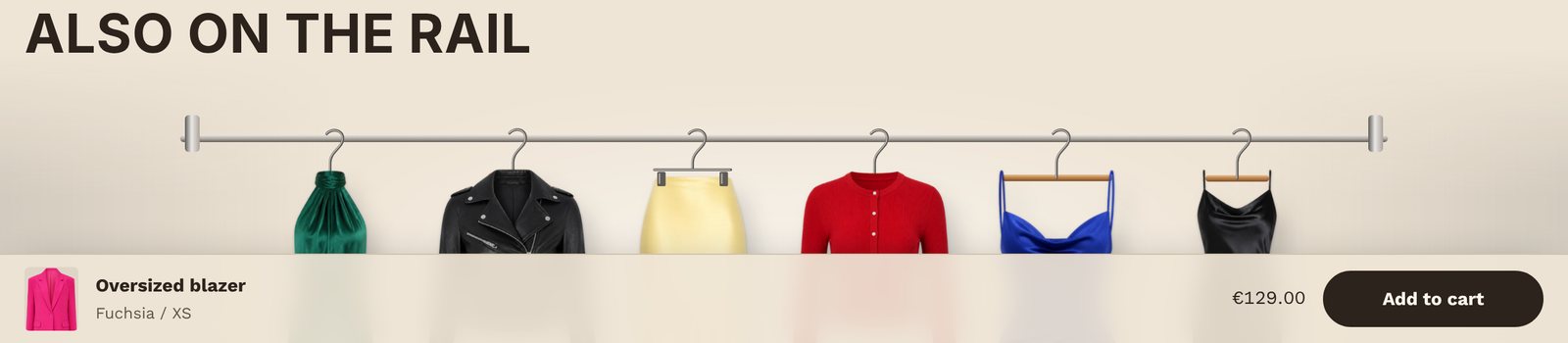
| Shop the look | A look photo beside its pieces: size picker and quick add for each, and one button to add the whole look to the cart. Without a photo, the pieces hang together on a rail. |
| Related products | Shopify recommendations, as a grid or on the rail. |
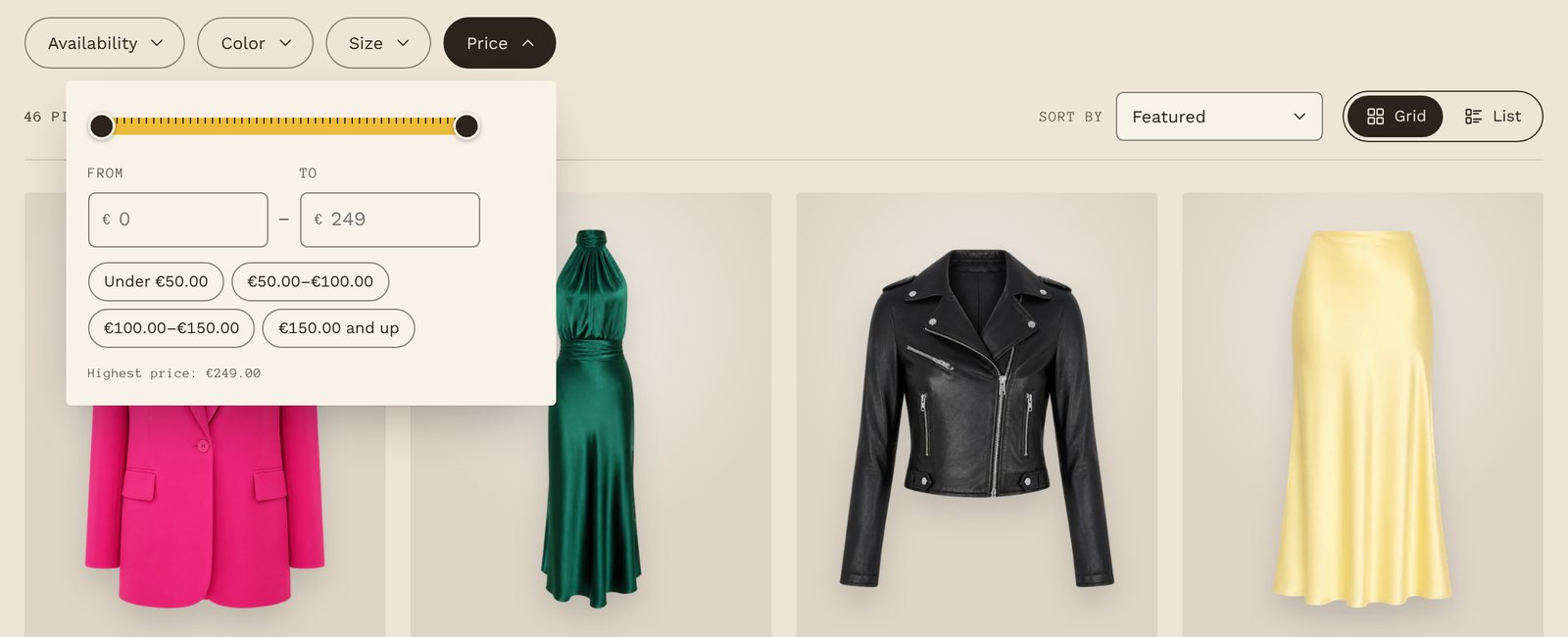
| Collection | Filters in a sidebar, a drawer or a horizontal bar of dropdowns. Colors show as hang tags, sizes as buttons, availability as a switch; price has a slider on a tape measure and one-tap price ranges; long lists get a search field. Active filters show as tags you can remove. Sorting, and a grid or list view (the list adds a short description); the shopper's choice is remembered. |
| Image banner, Image with text, Rich text | Brand storytelling blocks, with optional rail and hang tag details. |
| Featured collection, Collection list, Multicolumn | Product and collection showcases. |
| Questions and answers | An FAQ with numbered questions that open one by one. An answer can come from a page, so you write it once. |
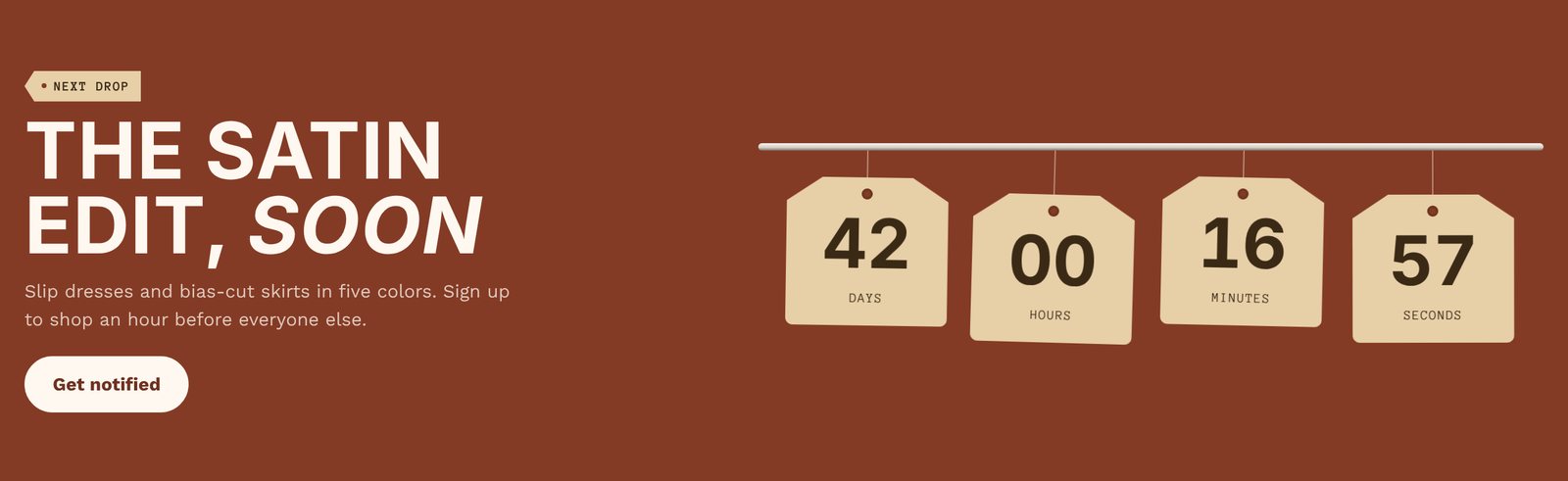
| Countdown | A countdown to a real date (a drop, the end of a sale), each unit on a hang tag. When the date passes, your text replaces it, or the section hides. |
| Email signup, Contact form | Newsletter and contact forms. |
| Blog posts, Article, Page, 404, Password | Content and utility pages. |
| Custom Liquid, Apps | Your own code and app blocks anywhere. |
60Collection filters
Shoppers sort a collection the way they would in a shop. Filters come from Shopify's free Search & Discovery app; the theme dresses them in its own style.
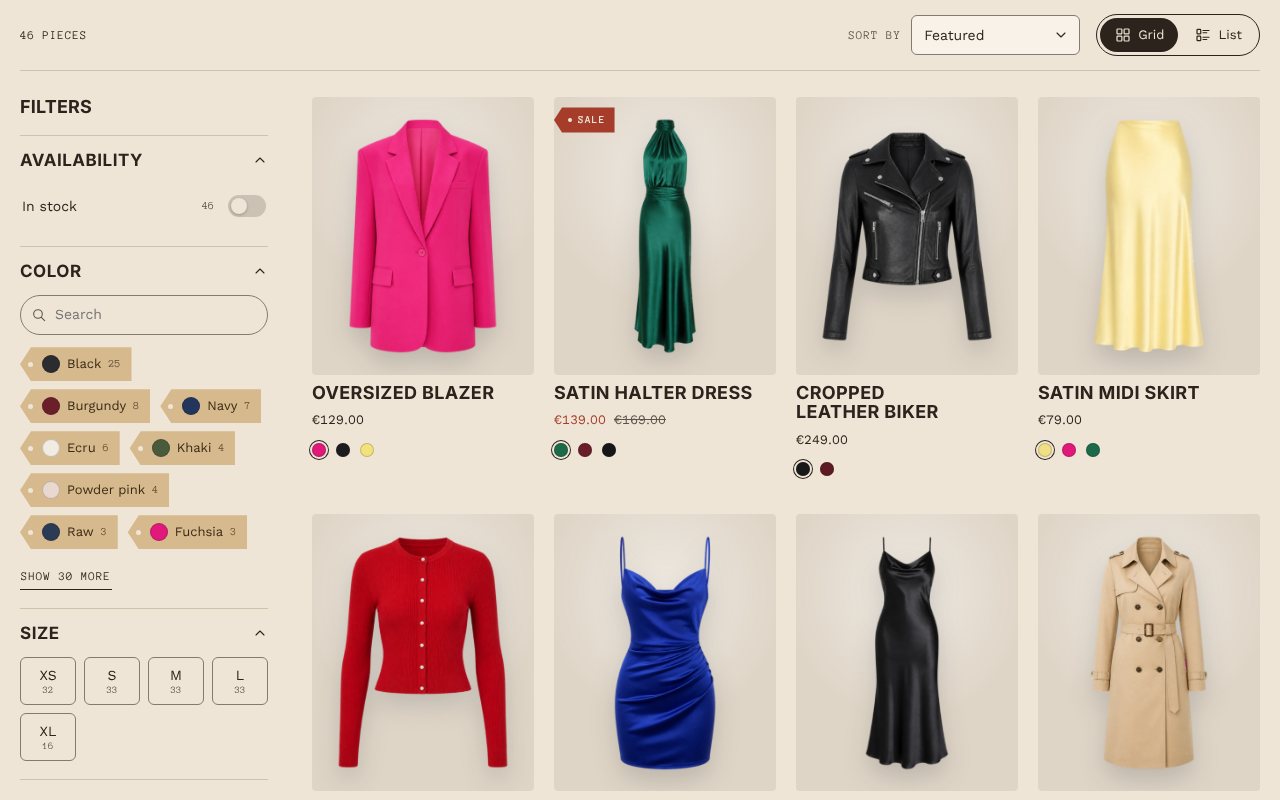
- Availability as a switch
- Search inside long lists
- Sizes as buttons, with their counts
- Sorting
- Grid or list view
- Three layouts in Collection › Filter layout: a sidebar that follows the scroll, a drawer, or a horizontal bar of dropdowns above the products. On phones, filters always open in a drawer.
- Price: a slider on a tape measure, two fields and one-tap price ranges.
- Colors show their swatch on a hang tag. Give each value of your color option a swatch in Shopify admin.
- Active filters show as tags above the products and go away in one click.
70Theme settings
Every color in the theme comes from color schemes. Changing a scheme updates every section that uses it, hangers and hang tags included.
| Scheme | Background | Suggested use |
|---|---|---|
| Wall | Warm plaster beige | Home page, rack, collection |
| Paper | Ivory | Featured product |
| Night | Espresso brown | Dark banners |
| Tape | Tape measure yellow | Newsletter, announcements |
| Terracotta | Terracotta | Countdown, occasional highlights |
Each scheme sets 13 colors: background, text, button and button label, panel and panel text, borders, rail and hangers, hang tags and their text, tape measure and its text, and sale.
- Typography: heading, body and label fonts, heading and body size, uppercase headings.
- Layout: page width, margins, corner radius of buttons, inputs and cards, breadcrumbs on product and collection pages.
- Rack and mockups: garment width on the rail, photo style (cut-out or framed), hanger finish (wood, steel or black), 3D depth and shadows (lit wall, soft cast shadows, garments that turn toward the pointer, hang tags that move gently), sway on hover, option names treated as colors.
- Product cards: color swatches shoppers can try on the card, back on hover, quick view, vendor.
- Cart: drawer or page, cart note, free shipping tape and threshold, payment icons under the checkout button.
80Product page
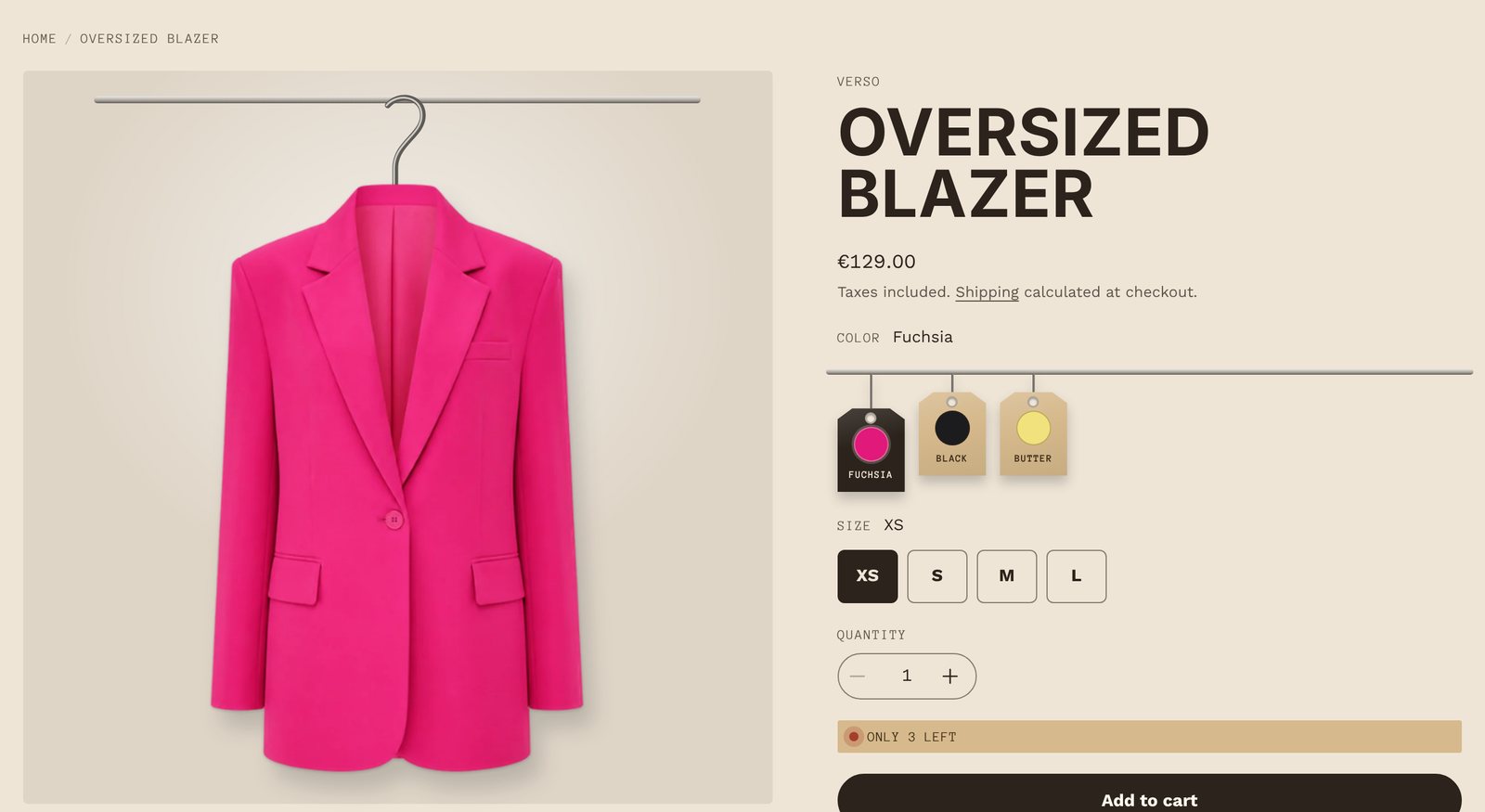
The product information column is built from blocks you can reorder: title, vendor, price, SKU, variant picker, quantity, stock counter, buy buttons, description, text, collapsible tab, size guide, share, complementary products, custom Liquid and app blocks.
- Gift cards can be sent to a recipient with a message and a send date.
- Subscriptions (selling plans), unit prices and Shop Pay Installments are supported.
- Local pickup availability updates with the selected variant.
- Videos and 3D models play in the gallery, with View in your space on supported devices.
- Quantity rules (minimum, maximum, increments) and volume pricing set for B2B catalogs show under the quantity selector and follow the selected variant.
90Features that help sell
The best-selling fashion themes share a few features that turn a visit into an order. Hangrail has them, drawn in its own showroom style. Each one is optional.
| Feature | Where to turn it on | What the shopper sees |
|---|---|---|
| Colors on the card | Theme settings > Product cards > Show color swatches | Pointing at (or tapping) a swatch shows that color's photo or recolors the mockup, without leaving the grid. The card then links straight to that color. |
| Stock counter | Product page, block Stock counter | "Only 3 left" on a kraft label when stock is low, updated for each variant. Optionally "In stock" above your threshold. |
| Add to cart bar | Product page, Show add to cart bar when scrolling | Once the main button scrolls away, a slim bar keeps the photo, the chosen variant, the price and the button in reach. |
| Photo zoom | Product page, Let shoppers zoom into photos | A magnifier on each photo opens it full screen at the best resolution. |
| Breadcrumbs | Theme settings > Layout | Home / Collection / Product above the page, to find the way back. |
| Questions and answers | Add the section anywhere | Sizing, shipping and returns answered before they ask. |
| Countdown | Add the section anywhere | The time left before a drop or until a sale ends. |
Stock counter: the number shown is your real Shopify stock. It appears only for variants whose inventory Shopify tracks and that can't be sold out of stock (Continue selling when out of stock turned off). Products without tracking show nothing.
Countdown: type the end date as 2026-12-24 18:00, in your store's time zone (Settings > General). Count down only to dates that are real: a timer that restarts on every visit misleads shoppers and is against Theme Store rules.
100Cart and checkout
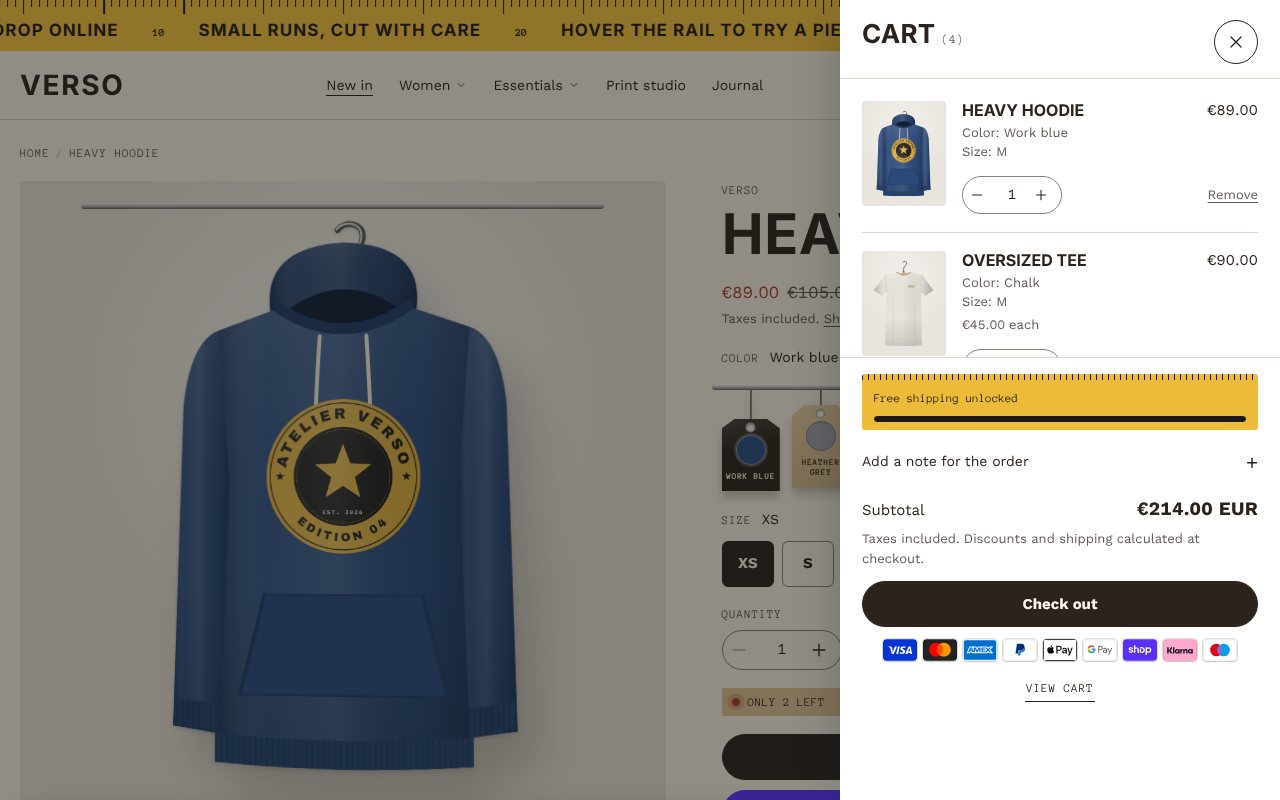
The cart opens as a drawer, or as a page if you prefer (Theme settings > Cart).
- Quantities update without reloading the page.
- Automatic and code discounts show per item and on the total.
- Optional order note and a free shipping tape measure with a threshold you set.
- Accelerated checkout buttons (Shop Pay, Apple Pay, Google Pay and more).
Checkout itself is managed by Shopify in Settings > Checkout.
110Languages and currencies
Hangrail is translated into 19 languages, for shoppers and for the theme editor:
- English
en - Français
fr - Deutsch
de - Español
es - Italiano
it - Nederlands
nl - Português (Brasil)
pt-BR - Português (Portugal)
pt-PT - Svenska
sv - Dansk
da - Norsk bokmål
nb - Suomi
fi - Polski
pl - Čeština
cs - Türkçe
tr - 日本語
ja - 한국어
ko - 简体中文
zh-CN - 繁體中文
zh-TW
- Add languages in Settings > Languages. The theme text switches automatically.
- Translate your own content (products, collections, section text) with Shopify's free Translate & Adapt app.
- Show the language selector in Header so shoppers can switch.
The country selector lists every country and currency you sell to in Settings > Markets, with a search field. Shopify converts prices automatically. Accepted payment methods appear in the footer with their official icons.
120Accessibility and performance
- Every interaction works with a keyboard, with visible focus.
- Animations stop when the device asks for reduced motion. The tape measure band has a pause button.
- Images load at the right size for each screen. Garment mockups are drawn in code, with no image to download.
130Frequently asked questions
- The mockup doesn't appear.
- Check the
mockup:tag (no space) and the type name in the table above. - The artwork is too small.
- Crop the
.pngclose to the drawing, or addprint-size:140. - The garment stays white.
- Give the option value a color swatch in Shopify admin.
- I want photos instead of a mockup.
- Remove the
mockup:tag. The photo style on the rail (cut-out or framed) is set in Theme settings > Rack and mockups. - The stock counter doesn't show.
- In the product's variants, turn on Track quantity and turn off Continue selling when out of stock. The counter shows at or below the threshold set in the block.
- The filters don't show.
- Create them in Shopify's Search & Discovery app, then check that Enable filtering is on in the Collection section.
- Can customers upload their own artwork?
- Not with the theme alone: it shows the artwork you add in Shopify admin. Customer personalization (upload, preview, order) needs a Shopify app.
140Support
Questions about Hangrail? Email ibradventure.company@gmail.com. We reply within two business days. Include your store address and, if something looks wrong, a screenshot.
150Changelog
| Version | Changes |
|---|---|
| 1.0.0 | First release. |